How to Improve My CV: A Step-by-Step UK Guide for 2026
Improve my cv - Need to improve your CV? This step-by-step guide for the UK job market shows you how to fix formatting, write for ATS, quantify achievements,

If you're searching "improve my CV", you probably already know something's off. Your CV may look busy but say very little, or it may list plenty of duties without showing why anyone should interview you. The fix usually isn't "rewrite everything". It's diagnosing the weak parts, then tightening structure, wording, and evidence so a recruiter can understand your value fast.
A better CV is easier to scan, easier for ATS software to read, and much stronger at proving results. The strongest versions use a clear format, a sharp summary, achievement-led bullet points, and customized wording for each role.
The Foundation Perfecting Your CV Structure and Format
Most CVs fail before the wording even matters. The layout is cramped, the order is confusing, or the reader has to work too hard to find key information. In the UK, the safest structure is still reverse chronological order because it lets employers see your most recent and relevant experience first.
That matters because recruiters don't read a CV like a novel. They scan for signals. Job title, dates, employers, skills, progression, and evidence of impact all need to appear where they expect them.
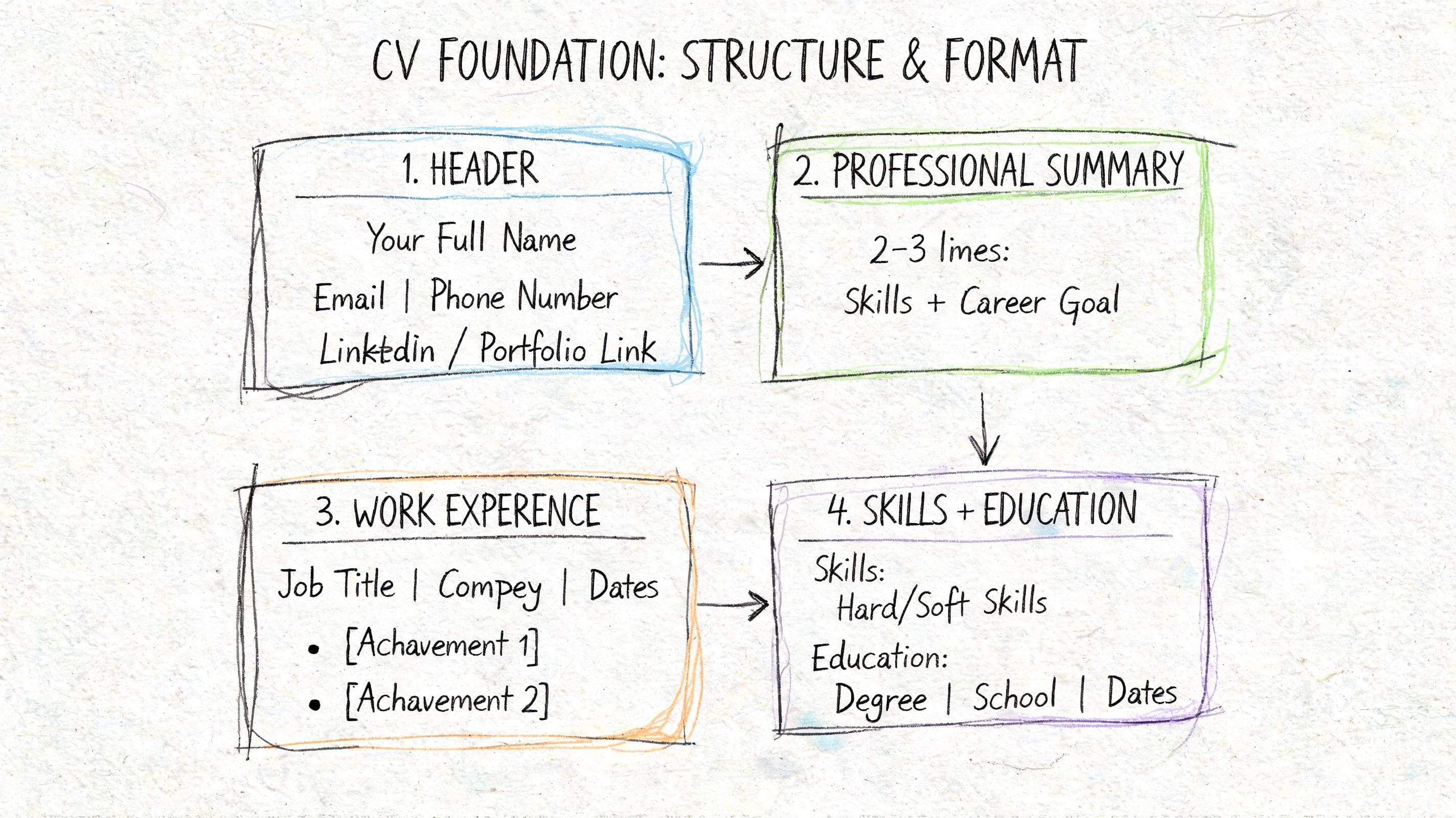
Use a structure recruiters recognise
A strong UK CV usually follows this order:
- Name and contact details
- Professional summary
- Key skills
- Work experience
- Education
- Certifications, projects, or additional sections if relevant
This order works because it answers the recruiter's main questions quickly. Who are you, what do you do, what can you bring, and where have you done it?
If your CV starts with a long personal profile, unrelated hobbies, or an oversized skills cloud, it slows the reader down. Clean hierarchy beats creativity here.
Practical rule: If a recruiter can't find your current role, core skills, and recent experience within a quick scan, your layout is doing damage.
Choose format choices that help screen reading
Most CVs are read on a screen first. That changes how formatting should work. Fancy design often looks impressive to the candidate and awkward to the reader.
Use simple, professional formatting:
- Font choice: Calibri, Arial, or another clean sans-serif font works well because it reads clearly on screens.
- Font size: Keep body text readable and headings distinct.
- Spacing: Use white space to separate sections and prevent visual clutter.
- Margins: Keep enough margin so the page doesn't feel crammed.
- Bullet points: Use consistent bullets and alignment throughout.
What doesn't work:
- Tiny text: Shrinking the font to squeeze in more content makes the whole CV harder to read.
- Dense paragraphs: Large blocks of text hide your strongest points.
- Visual gimmicks: Icons, rating bars, coloured boxes, and decorative layouts usually add noise rather than value.
Audit your current CV like a recruiter would
Open your CV and look at it for a few seconds. Don't read every line. Scan it.
Check for these problems:
- Messy section order: Experience buried below less important content.
- Inconsistent formatting: Dates on one side in one role and somewhere else in another.
- Weak visual hierarchy: Headings, employers, and job titles all competing for attention.
- No white space: Everything pushed together to fit more in.
- Long opening paragraph: Summary that says little and delays the concrete evidence.
A tidy CV doesn't need to look "designed". It needs to look controlled. That's a different standard.
Build from a strong template, then simplify
If your current document is hard to fix, rebuild it from a plain version rather than patching a bad format. A good template gives you consistency. True improvement comes from editing what stays and cutting what doesn't.
Use this quick structural checklist before changing the wording:
- Put recent experience first
- Keep section headings standard and clear
- Use one style for dates, one style for headings, one style for bullets
- Leave enough white space between sections
- Make each role easy to skim
For a fuller breakdown of what a polished layout should include, this guide on how to write a professional CV is a useful companion.
Does your CV clearly show results for each role?
Turn a weak CV into a stronger one
Upload your CV → get stronger wording instantly → fix the weakest parts first.
No need to rewrite. Start with your current CV.
Writing for Robots Making Your CV ATS-Friendly
A lot of candidates think ATS optimisation means stuffing a CV with keywords. That's not the first problem. The first problem is parsing. If the system can't read your document properly, it can't score your experience properly either.
That's why strong content still gets ignored. The CV looks polished to a human, but the ATS reads it as broken fragments because the formatting gets in the way.
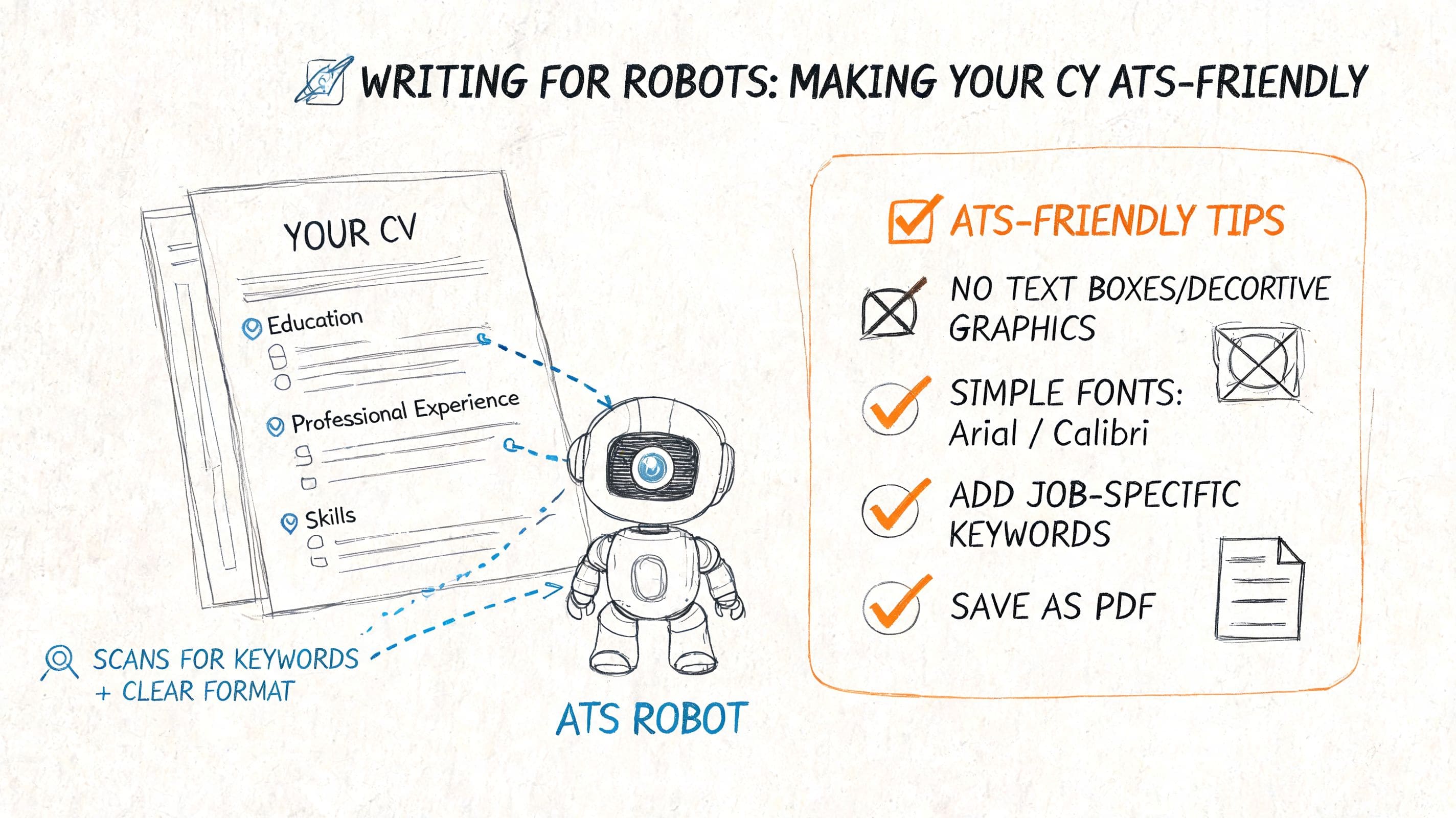
The formatting choices that break ATS parsing
ATS software prefers straightforward documents. It handles plain text and standard structure best. Problems usually start when candidates use layouts built for design rather than readability.
Avoid these common ATS traps:
- Tables and text boxes: They often split content into the wrong fields.
- Multiple columns: The parser may read across the page in the wrong order.
- Headers and footers for key details: Contact information can get missed.
- Graphics and icons: These add little value and can confuse the system.
- Creative section headings: A heading like "What I Bring" may not be recognised as skills or experience.
If you want your CV to survive the first digital screen, plain wins.
Use headings the system understands
Section titles matter more than candidates realise. Standard headings help both ATS software and recruiters identify what they're looking at.
Use headings like:
- Professional Summary
- Key Skills
- Work Experience
- Education
- Certifications
Avoid headings that sound clever but create ambiguity. "My Career Journey" is weaker than "Work Experience" because the second one is immediately clear to both machine and human readers.
Keep the wording of your section headings boring. Boring is readable.
Keywords need context, not stuffing
A job description tells you what the employer wants to find. Pull the important terms from it, then mirror them naturally in your CV where they genuinely apply. That means job titles, software, methods, technical skills, and domain language.
What works:
- If the job description says stakeholder management, use that phrase if you've done it.
- If it asks for Excel modelling, don't hide that under "spreadsheet work".
- If it requires customer query resolution, use a clear bullet that reflects that kind of work.
What doesn't work:
- Repeating the same term in a skill list with no evidence.
- Adding jargon that doesn't match your experience.
- Replacing plain English with buzzwords.
This matters even more in technical hiring. DataGibberish reports that over 80% of CVs from technical fields overuse buzzwords such as "team player", which can reduce ATS pass rates to below 20% because systems prioritise evidence-based skills over generic claims.
A practical ATS checklist
Before sending any application, run through this list:
- Check the file layout: One column is safer than a design-heavy format.
- Move vital details into the main body: Name, phone, email, and links should not sit in headers or footers.
- Match the language of the job ad: Use the employer's terms where they truthfully fit.
- Keep bullets plain: Standard bullets parse more reliably than decorative symbols.
- Use simple job titles where needed: If your internal title was vague, clarify it with language employers will understand.
If you're applying widely, ATS checking by eye gets slow. That's where a proper keyword and job description comparison tool helps. If you want a deeper look at formatting and keyword alignment, this guide to an ATS-friendly CV in the UK covers the essentials cleanly.
Crafting Your Narrative with an AI-Enhanced Professional Summary
A weak summary usually sounds like this:
"Hardworking and motivated professional with excellent communication skills seeking a challenging opportunity to grow and contribute to a dynamic team."
That summary could belong to almost anyone. It tells the recruiter nothing useful. No level, no specialism, no context, no evidence.
A stronger summary sounds like a real person with a clear professional direction.
Before and after a summary rewrite
Here's the kind of rewrite that changes the tone of a CV immediately.
Before
Recent graduate with strong organisational and teamwork skills. Looking for an opportunity to develop professionally in a fast-paced environment. Passionate about learning and helping businesses succeed.
After
Marketing graduate with hands-on experience in content, campaign support, and social media coordination through internships and university-led projects. Strong at turning briefs into clear copy, organising deadlines, and working across teams. Looking to step into a junior marketing role with a focus on digital execution and measurable growth.
The second version works because it does three things well. It names a field, gives credible context, and points towards a target role. It sounds grounded.
What a good summary should actually do
Your professional summary should be short. Usually three to four lines is enough. Its job isn't to tell your life story. Its job is to frame the rest of the CV.
A useful summary includes:
- Your current professional identity: Graduate, analyst, project coordinator, customer service manager.
- Your relevant area of strength: Operations, finance support, software testing, content marketing.
- Your evidence of fit: Sectors, tools, projects, or kinds of problems you handle.
- Your direction: The role or move you're targeting.
Don't use the summary to say you're "hardworking", "driven", or a "great team player". Your work history should prove those things.
Where AI helps and where it hurts
AI is useful at the draft stage. It can turn scattered notes into a clean first version, suggest stronger phrasing, and help you spot repetition. It's especially helpful when you know your CV is weak but can't yet see why.
The risk is sounding synthetic. As of 2026, ATS tools can flag "AI-generated" content with increasing accuracy, marking up to 28% more submissions, and entry-level applicants can see an 18% drop in interview rates when that content reads as machine-made. That's why AI should draft, not impersonate you.
Use AI well by giving it:
- Your real experience
- The job title you want
- The industry language from the advert
- A request for plain, natural wording
Then edit for voice. Remove anything you wouldn't say. Cut inflated claims. Add specifics only you would know.
Recruitment teams are also using AI on their side. If you want context on how employers are applying conversational tools in hiring workflows, this piece on automating hr with SupportGPT is worth reading.
For a practical formula and examples, this article on how to write a professional summary gives a solid starting point.
Proving Your Value with Achievement-Focused Bullets
Most CVs break down at this stage. The candidate performed real work, but the bullet points hide that impact under task language.
"Responsible for managing social media accounts" is a task.
"Increased LinkedIn engagement by 45% over six months through targeted content strategy" is evidence, and that kind of quantified achievement is exactly what recruiters respond to, as shown in guidance from Hays on adding quantifiable results to your CV.
The formula that improves weak bullets
The strongest bullets usually follow a simple pattern:
Action verb + quantifiable result + specific context
That's the core. If you need a framework to think it through, use STAR:
- Situation What was happening?
- Task What were you responsible for?
- Action What did you do?
- Result What changed because of it?
You won't write STAR labels into the CV. You'll use them to extract the result from work that currently reads like a duty list.
If a bullet starts with "Responsible for", there's a good chance it's hiding the best part.
Before vs. After: From Tasks to Achievements
| Weak Bullet Point (Task-Based) | Improved Bullet Point (Achievement-Focused) |
|---|---|
| Responsible for social media content | Increased LinkedIn engagement by 45% over six months through targeted content strategy |
| Managed a team and improved workflow | Managed a team of four, improving productivity by 30% via workflow automation |
| Helped grow the client base | Delivered 37% growth in new client acquisition through targeted outreach and follow-up |
| Handled customer queries | Resolved 93% of queries within 24 hours, boosting satisfaction by 20% |
| Worked on email campaigns | Grew the email list by 23% quarterly through segmented campaign planning |
Notice what changed. Each stronger bullet shows an action, an outcome, and enough context to make the claim believable.
How to find metrics when your role didn't feel measurable
Candidates often say, "My job wasn't numbers-based." Usually that means the numbers weren't tracked in one obvious dashboard. They still exist.
Look for metrics in these categories:
- Money: Revenue influenced, costs reduced, budget handled.
- People: Team size, number of customers, hiring support, stakeholders.
- Time: Deadlines hit, faster turnaround, response time, project duration.
- Volume: Tickets handled, reports produced, accounts managed, events delivered.
- Ranking or position: Search rankings, quality scores, internal standing.
Even early-career work can be quantified. Hays and related career guidance examples include outcomes such as improving productivity by 30%, increasing engagement by 45%, or showing 37% growth in client acquisition when the candidate can tie work to measurable change.
Rewriting process that actually works
Take one role from your CV and do this:
- Write the plain task as it stands now.
- Ask, "How many, how often, how long, how much, or what changed?"
- Add one result.
- Cut filler words.
- Keep the bullet focused on one achievement, not three half-explained tasks.
Here are better prompts to ask yourself:
- What did I improve?
- What did I speed up?
- What did I reduce?
- What did I help deliver?
- What was different after I got involved?
Common fixes for bullet point problems
- Weak verbs: Replace "helped with" and "worked on" with verbs that show ownership.
- No result: Add the outcome, not just the activity.
- Too broad: Split overloaded bullets into separate achievements.
- No context: Include the team, channel, customer group, or business purpose if that makes the result clearer.
If you want more examples by role and format, this guide to stronger resume bullet points is useful even if you're writing a UK CV. The principle is identical. Show outcomes, not job descriptions.
The Final Polish Tailoring and Fixing Common Mistakes
A generic CV is rarely a competitive CV. Once the structure, summary, and bullet points are strong, tailoring becomes the difference between "good document" and "relevant application".
That's why one of the biggest mistakes candidates make is sending the same CV everywhere. A recruiter doesn't judge your CV in isolation. They judge it against a specific vacancy.
Why tailoring is not optional
A role advert is a filter. It tells you which skills, tools, and priorities matter most for that employer. If your CV doesn't reflect those priorities, the fit looks weaker than it really is.
This matters even more for non-linear careers. LinkedIn's 2025 Workforce Report data notes that 42% of professionals changed industries in the last two years, yet career changers often face 30% lower callback rates because their CVs fail to build a coherent narrative between past experience and the target role.
If you're changing direction, the answer isn't to hide your background. It's to frame it around transferable value.
Use a master CV, then tailor the working copy
The fastest way to tailor well is to maintain a master CV. That document contains all your experience, metrics, projects, and versions of bullet points. You never send it. You use it as your source file.
Then create a customized version for each application by adjusting:
- The summary: Align it to the target role.
- The top skills: Mirror the wording used in the advert.
- The bullet point order: Put the most relevant achievements first.
- Optional sections: Surface projects, certifications, or tools that match the role.
This doesn't mean rewriting from scratch every time. It means shifting emphasis so the recruiter sees the match faster.
The mistakes that still cost strong candidates interviews
Even when the content is good, small errors still undermine credibility. These are the ones I see most often:
- Spelling and grammar slips: They signal rushed work.
- Date inconsistencies: Different date formats make the CV look careless.
- Mixed tenses: Current role should read differently from past roles.
- Generic language: "Results-driven professional" says less than a concrete example.
- Skill dumping: Long software lists with no evidence in experience.
- Misaligned title: The CV says one thing, the target role asks for another, and the summary never bridges the gap.
Career changers need one extra check. Every section should support the same story. If you're moving from teaching into project coordination, don't just list classroom duties. Show planning, stakeholder communication, delivery under pressure, and measurable outcomes.
Breadth becomes an asset when you organise it around relevance.
A final review pass
Before you apply, review your CV against the vacancy, not against your own intentions. Ask:
- Does the first half of page one match the role clearly?
- Are the most relevant achievements easy to spot?
- Have I replaced generic claims with evidence?
- Would a recruiter understand my direction without guessing?
A second pair of eyes helps, but a structured review helps more. If you want to pressure-test your document before sending it, a CV review guide can help you catch the gaps candidates often miss in their own writing.
Your CV Improvement Questions Answered
How long should my CV be in the UK
Most UK professionals should aim for a CV that is as long as necessary and no longer. For many candidates, that means two pages. A one-page CV can work for students or very early-career applicants, but the rigid one-page rule is a myth if it forces you to cut evidence that matters.
The true test is relevance. If half of page two is weak or outdated, trim it.
Should I include a photo on my CV
Usually, no. In the UK, a photo is not standard for most roles and often adds no value. A recruiter wants to assess experience, fit, and evidence of performance. Keep the focus there.
What is the difference between a skills section and work experience
Your skills section is a quick scan area. It tells the reader what tools, methods, or strengths you bring. Your work experience proves those skills in action.
If the skills section says "stakeholder management" but your experience never demonstrates it, the claim is weak. This is also why quantified achievements matter. Recruiter analysis shows that CVs with quantified achievements receive 40% more interview calls because recruiters spend only 7 to 10 seconds on the initial scan, and metrics make value easier to spot.
How far back should my work experience go
Include the experience that supports your current target role. For many candidates, that means focusing detail on the most recent and relevant roles and compressing older work. If an older role is no longer relevant, a shorter entry is enough.
Can I use AI to improve my CV
Yes, but use it as a drafting assistant, not a replacement for judgment. It's good for rewriting rough sentences, spotting repetition, and generating first-pass summaries. It's bad at knowing which claims sound inflated, vague, or unlike you.
The safest rule is simple. Let AI speed up the drafting. Let your own edits make the CV credible.
If you want a faster way to move from rough draft to customized application, CV Anywhere helps you build an ATS-friendly CV, check job-description fit, and track applications in one place so you can spend less time rewriting and more time applying well.
Tags
Related articles
How to Write a CV Quickly: A 60-Minute Guide
You’re probably here because a job has landed in your inbox and you need to write a CV quickly without sending something sloppy. The good news is that speed isn’t the problem. Bad priorities are. A fa...
Create a CV Fast: A 60-Minute UK Workflow
Need to create a CV fast because a role closes soon, you've got three tabs open, and your old CV still talks about the wrong job. The quickest way isn't typing faster. It's using a focused workflow th...
How to Make a CV for the First Time: A Step-by-Step Guide
Your first CV does not need a job history to work. It needs proof that you can do useful work. For first-time applicants, the strongest material often comes from school projects, coursework, volunteer...
How Can I Make My CV Better? A Practical UK Guide
If you're asking how can i make my cv better, the short answer is this. Stop treating it like a job history and start treating it like evidence. A better CV shows what changed because you were there, ...
Popular Articles
You’re probably here because a job has landed in your inbox and you need to write a CV quickly without sending something sloppy. The good news is that speed isn’t the problem. Bad priorities are. A fa...
Need to create a CV fast because a role closes soon, you've got three tabs open, and your old CV still talks about the wrong job. The quickest way isn't typing faster. It's using a focused workflow th...
Your first CV does not need a job history to work. It needs proof that you can do useful work. For first-time applicants, the strongest material often comes from school projects, coursework, volunteer...
If you're asking how can i make my cv better, the short answer is this. Stop treating it like a job history and start treating it like evidence. A better CV shows what changed because you were there, ...