
Choosing the perfect template for resume creation is the most important first step in your job search; it's a strategic move that determines whether you get noticed or ignored by recruiters and hiring software. A great template immediately signals your professionalism and makes your qualifications easy to find. For most professionals in the US job market in 2026, the best choice is a clean, reverse-chronological layout that is optimized for Applicant Tracking Systems (ATS). This format is what US recruiters expect to see and it allows them to quickly identify your key skills and experience, dramatically increasing your chances of landing an interview.
Choosing the Right Template for Your Career Story
Think of your resume template as the packaging for your career. The best product in the world won't sell if it's in a confusing or broken box. With recruiters spending mere seconds on each resume, your layout has to do the heavy lifting for you, instantly signaling your value.
This choice is even more critical now that AI is the first gatekeeper. By 2026, a staggering 83% of US companies rely on software to screen resumes first. Your template must be built for a machine to parse and a human to love.
And it's not just companies using AI. Recent data shows that 68% of job seekers now use AI tools to help write their resumes. The game has changed, and your template choice is your opening move.
Which Resume Template Should You Use?
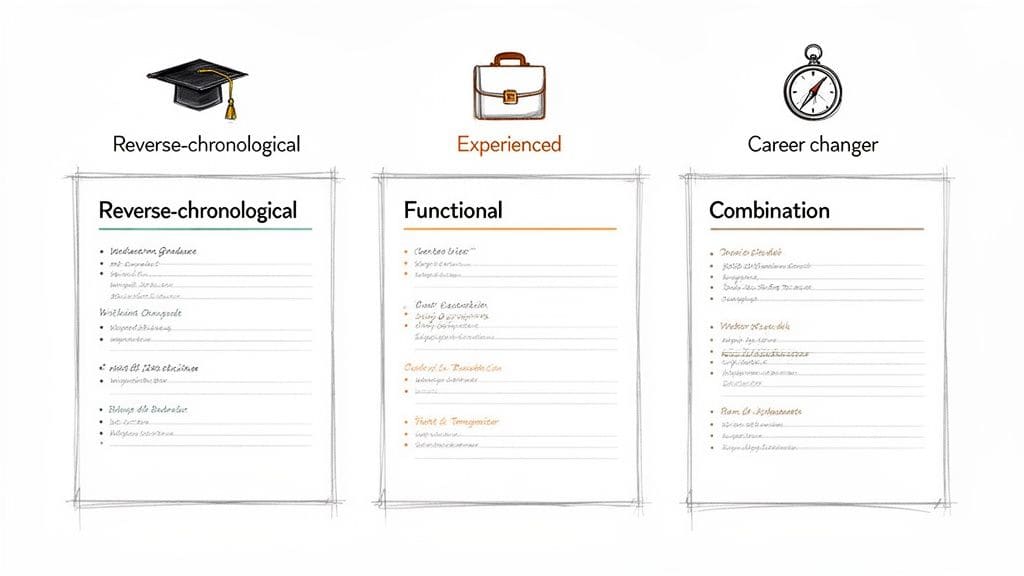
There are three primary formats, and the right one depends entirely on your professional story. Don't just pick the one that looks coolest; choose the one that tells your story best.
The table below breaks down which format works for different career situations, helping you make a smart, strategic choice from the get-go.
| Template Type | Best For | Key Feature |
|---|---|---|
| Reverse-Chronological | Professionals with a steady career path. | Highlights recent experience and clear career progression. This is the industry standard. |
| Functional | Career changers, those with employment gaps, or people re-entering the workforce. | Emphasizes transferable skills and de-emphasizes a non-linear work history. |
| Combination / Hybrid | Experienced professionals or specialists with highly specific skills. | Blends a powerful skills summary at the top with a traditional work history below. |
For the vast majority of job seekers, the Reverse-Chronological format is the safest and most effective bet. It's what hiring managers are used to and what most Applicant Tracking Systems (ATS) are programmed to read flawlessly.
A great template for a resume does more than just organize information—it tells a clear and compelling story. It guides the reader's eye straight to your biggest strengths and makes a powerful first impression.
For example, a recent graduate with a few strong internships should absolutely use a reverse-chronological template to showcase their fresh, relevant experience. On the other hand, a military veteran transitioning to a corporate project management role might choose a combination template. This would let them spotlight leadership and logistics skills upfront before listing their service history.
To see these formats in action, you can explore our library of professional resume templates and find the perfect foundation for your career story.
Is your resume actually getting responses?
Your resume might be missing something important
Upload your resume → see its weakest areas → fix them, one by one.
Free. Takes less than 2 minutes.
Making Your Resume Template ATS-Friendly
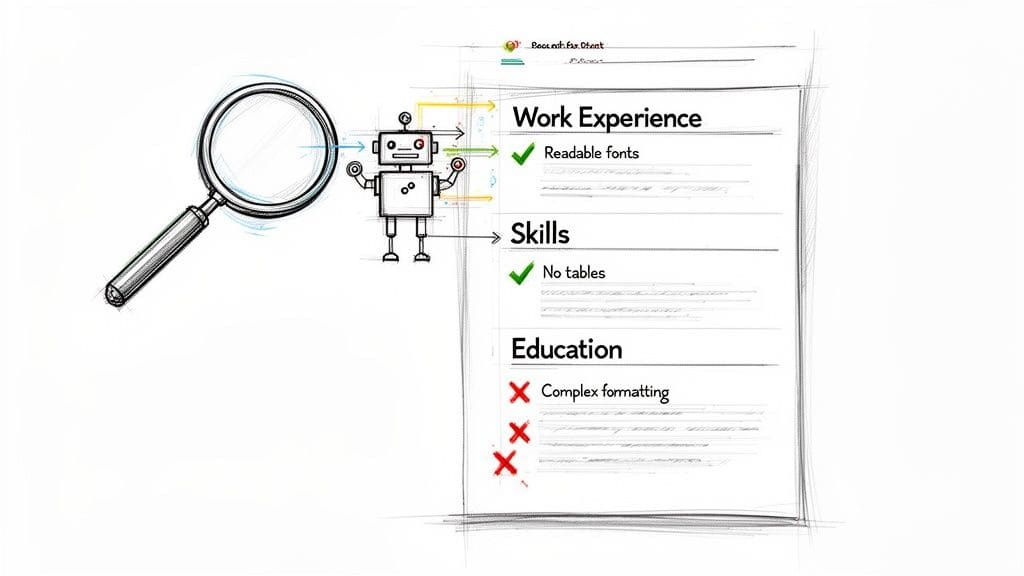
Let's be blunt: getting your chosen template for resume past the digital gatekeepers—the Applicant Tracking Systems (ATS)—is your first and most critical test. If your resume isn't built for a machine to read, it won't ever reach a human. No matter how perfect you are for the job.
Making a template ATS-friendly means stripping it back to the essentials. It's about ensuring a machine can parse your qualifications without getting tripped up.
Complex formatting is the enemy here. While a fancy design with graphics, columns, or text boxes might look impressive to you, it often confuses the ATS. The software can jumble your experience or miss entire sections. Suddenly, your promotion looks like an entry-level job, or your skills section disappears completely.
The core principle of an ATS-friendly resume is simplicity. If a machine can't easily read your experience, it doesn't matter how qualified you are—you'll be invisible to the recruiter.
This is why a clean, single-column layout is non-negotiable. Stick with standard, web-safe fonts like Arial, Calibri, or Helvetica. These choices guarantee your resume will look and read correctly on any system.
Building a Readable Foundation
Once the layout is clean, your next focus is structure. The ATS is programmed to find specific section headings to make sense of your career story. Get too creative, and you'll pay the price.
Using a heading like "My Professional Journey" instead of "Work Experience," for example, can cause the system to skip over your entire career history. Don't risk it.
Stick to standard, universally recognized headings that every ATS will understand:
- Work Experience (or Professional Experience)
- Education
- Skills
- Contact Information
This clear structure acts like a roadmap, guiding both the software and the human recruiter who will (hopefully) see your application next. If you want more detailed examples, our complete guide on creating an ATS-friendly resume template breaks it down even further.
Weaving in the Right Keywords
Beyond clean formatting, keywords are what get you noticed. This isn't about "stuffing" your resume with buzzwords. It's about strategically mirroring the language in the job description to signal you're a direct match.
With 66% of workers now feeling that AI has made the job hunt more competitive, this alignment is absolutely essential.
Start by dissecting the job posting. Pull out the key skills, tools, and qualifications the employer repeatedly mentions.
For instance, if a job description for a Blog Writer lists "SEO," "content calendars," and "viral marketing," make sure those exact phrases appear in your skills or experience sections. This simple technique transforms a generic resume into a targeted application, proving to the ATS that you have what it takes and dramatically increasing your odds of landing on the hiring manager's desk.
Transforming Responsibilities Into Achievements
Once your template is set up to sail past the resume bots, your real job begins. You have to craft content that actually grabs the attention of a human hiring manager. A generic resume filled with passive job duties gets you exactly what you'd expect: generic results.
To stand out, every single line on your resume needs to prove your value. You do that by showing what you accomplished, not just what you were told to do.
This pivot from duties to achievements is your most powerful move in a tough market. In 2026, finding qualified candidates is the single biggest challenge for 46% of US employers. Your resume content is your chance to show up as the solution they've been looking for. You can see more on these current recruiting challenges and statistics on Jobscore.com.
From Task Lists to Impact Stories
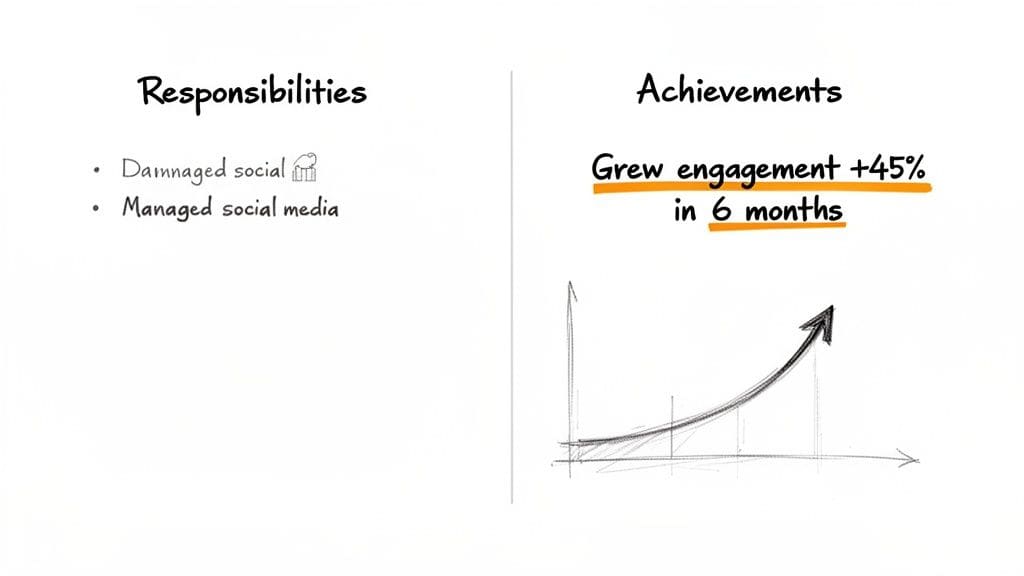
Most resumes I see read like a laundry list of tasks. "Managed social media," "Wrote blog posts," or "Handled customer inquiries." These statements are dead on arrival—they tell a recruiter nothing about your performance or impact.
To bring them to life, you have to add context and, most importantly, metrics. Ask yourself: what happened because I did that task?
- Before: Managed social media pages.
- After: Grew social media engagement by 45% over six months by executing a data-driven content strategy.
See the difference? The "After" example shows how you did it (a data-driven strategy) and the impact it had (45% growth). This simple reframe turns a boring duty into a powerful story of achievement.
Quantifying Your Success
Numbers always speak louder than words. Using hard data to quantify your accomplishments is the fastest way to prove your value. Even if you don't have precise percentages, you can use estimates, ranges, or frequency to give your claims real weight.
Let's look at a few real-world examples:
- For a Software Engineer: Instead of "Wrote code for new features," try "Developed and deployed 3 major product features, resulting in a 15% reduction in customer support tickets."
- For a Sales Representative: Don't just say "Met sales targets." Instead, write "Exceeded quarterly sales targets by an average of 20%, generating over $500,000 in new revenue for 2025."
- For a Project Manager: Move beyond "Led project teams." A much better version is "Managed a cross-functional team of 8 to deliver a complex software project 2 weeks ahead of schedule and 10% under budget."
This method works for every single role. Think about time saved, money earned, processes improved, or customer satisfaction boosted. For more ideas, check out our guide on how to write powerful resume bullet points.
Your resume is not a historical document of your job duties; it is a marketing document designed to sell your skills and potential. Every bullet point is an advertisement for your abilities.
By focusing on measurable outcomes, you provide concrete proof of your capabilities. This approach transforms a simple template for resume from a passive document into an active, compelling argument for why you are the best candidate for the job. It's a small change in perspective that makes a massive difference.
Enhancing Your Resume With Smart Design Choices
Once you've nailed your content and structure, it's time to focus on the final piece: design. This isn't about making your resume flashy or over-the-top. Instead, it's about using smart, subtle visual cues to elevate your professional brand and guide a recruiter's eye exactly where it needs to go.
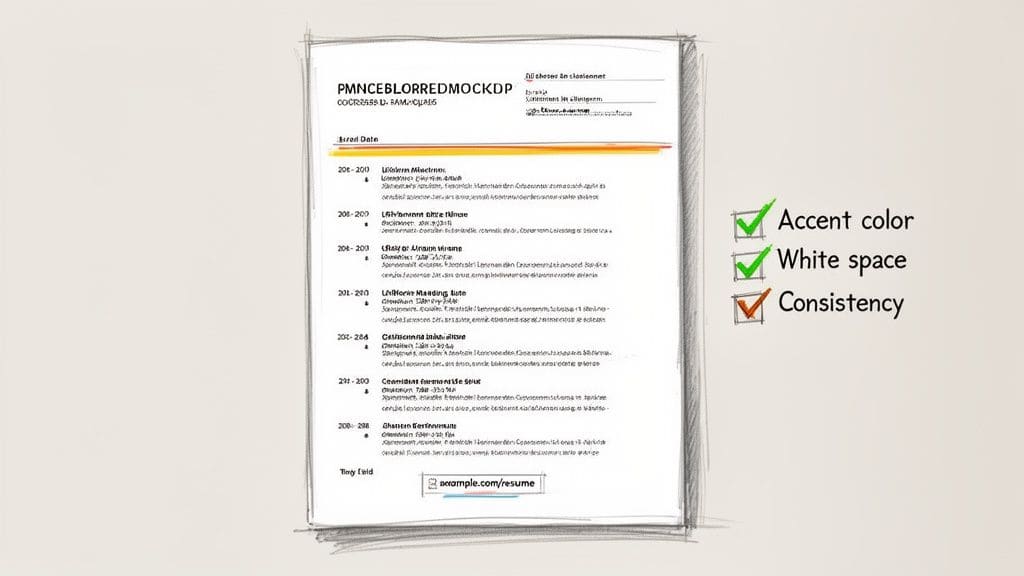
A well-designed resume just feels easier to read. It looks polished and professional at a glance, and that first impression is powerful. Understanding the power of color in design can make a huge difference here. A single, well-placed accent color draws attention to headings or your name, making your document memorable without confusing an ATS or overwhelming the reader.
Using White Space and Color Wisely
Often, the most powerful design tool you have is what you leave out. Generous white space—the empty areas around your text and between sections—is your best friend. It stops your resume from looking cluttered or desperate.
More importantly, it makes the document feel organized and confident. That's a huge advantage when a recruiter is only giving your resume a few seconds for that first scan.
When it comes to color, less is definitely more. Stick with a single, professional accent color. Think deep navy blue, a muted forest green, or a sophisticated burgundy. Use it consistently for a few key elements:
- Section headings ("Work Experience," "Skills," etc.)
- Your name at the top of the page
- Hyperlinks to your portfolio or LinkedIn profile
This simple tactic creates a clean, cohesive look that helps your resume stand out in a sea of black and white.
Your resume's design should make crucial information easy to find. Think of it as creating a clean, well-lit path for the hiring manager to follow directly to your most impressive qualifications.
Maintaining Flawless Design Consistency
Nothing screams "lack of attention to detail" like inconsistent formatting. It's a major red flag for recruiters. A good template for resume gives you a head start, but it's on you to maintain that consistency as you add your own content.
Before you send your resume anywhere, do a quick final check. Look at every single entry and confirm that the formatting is uniform.
- Headings: Are all your main and subheadings the same font, size, and style?
- Dates: Is your date format ("May 2026" vs. "05/2026") identical for every job and educational item?
- Bullet Points: Do all bullet points use the same symbol and have the same indentation?
Getting these small details right is crucial. For a deeper dive, our guide on perfecting your resume layout provides a complete checklist. These small touches work together to create a powerful impression of professionalism, reinforcing the quality of the content within your resume.
Finalizing, Exporting, and Submitting Your Resume
You've poured hours into crafting the perfect content and choosing a template that shines. Don't let it all go to waste in the final stretch. This is where precision separates the pros from the amateurs. A single, careless mistake can undo all your hard work, so let's walk through the final checks that ensure your resume lands with confidence.
It all starts with the file format. My advice? Always, always use a PDF. I've seen it happen too many times: a perfectly good Word document gets opened on a recruiter's Mac and the formatting completely implodes. A PDF is like a digital snapshot—it locks in your design, fonts, and spacing, ensuring what you see is exactly what they see. It's a simple move that signals professionalism.
The Essential Final Proofread
Spell check is your friend, but it's not your editor. It's a great first pass, but it will blissfully ignore context errors like writing "manger" when you meant "manager." It also won't catch inconsistent date formats or awkward phrasing. A manual proofread isn't just a good idea; it's non-negotiable.
Before you even think about hitting send, you need to go over your resume with a fine-tooth comb. A great trick is to read it backward, from the last word to the first. This forces your brain out of its natural reading rhythm and helps you spot individual errors you'd otherwise skim over.
- Grammar and Spelling: Hunt for typos, misused words, and grammatical slip-ups.
- Consistency: Are all your dates formatted the same way (e.g., "May 2026" vs. "05/2026")? Do all your headings and bullet points follow a uniform style?
- Contact Information: This one is critical. Double-check your phone number for typos. Click on your LinkedIn URL to make sure it actually works.
- Clarity: Read every single bullet point out loud. Does it sound clunky? Is the impact clear and immediate?
For a deeper dive into making your resume flawless, our complete guide to a professional resume review has you covered.
Exporting and Naming Your File
Once you're certain your resume is perfect, it's time to save it correctly. The file name is often the very first thing a recruiter or hiring manager sees in their downloads folder. This is your first impression.
A file named "Resumefinalv3.docx" just screams disorganization. A clean, professional file name like "FirstName-LastName-Resume.pdf" immediately shows you're a polished candidate who pays attention to detail.
As mentioned, always export the final version as a PDF. It's the undisputed industry standard for a reason. It preserves your layout and makes you look like you know what you're doing.
Managing and Submitting Your Application
For every single job you apply to, you should have a slightly tailored version of your resume. This means organization is your best friend. I recommend a simple folder system on your computer: create a main folder for your job search, with subfolders for each company. Inside each company folder, save the exact resume and cover letter you sent them.
This little bit of housekeeping pays off big time, especially when you need to follow up or you land an interview. You'll be able to pull up the exact document they have in front of them in seconds. To really make your application pop, think about strategies for crafting a compelling cold email for a job and reaching out to the hiring manager directly.
By combining a polished resume with a smart, strategic submission process, you present yourself as a detail-oriented and highly competent professional from the very first click.
Common Questions About Resume Templates
As you put the finishing touches on your resume, a few nagging questions always seem to pop up. These are the small details that can make a big difference, and getting them right is what separates a good application from a great one.
Let's clear up some of the most common queries we hear from job seekers in 2026 so you can submit your resume with complete confidence.
What's the Best Resume Template for Someone With No Experience?
If you're a recent graduate or have a thin work history, your instinct might be to panic. Don't. The key is to change the focus from where you've worked to what you can do.
A functional resume template is your best bet here. This format puts your skills in the spotlight, not your lack of formal roles. Think of your experience in terms of capabilities, not just jobs.
You can organize your resume around skill-based headings like these:
- Project Coordination: Use examples from academic group work, volunteer events, or even personal projects where you managed tasks and hit deadlines.
- Communication & Teamwork: Pull from experiences in university clubs, part-time retail jobs, or group presentations.
- Technical Abilities: List all relevant software, coding languages, or digital tools you've mastered.
This strategy proves your value based on potential and demonstrated skills, which is exactly what recruiters look for in entry-level candidates.
Can I Use a Two-Page Resume in 2026?
Yes, you can—but the real question is, should you? The old one-page rule isn't as rigid as it once was, but it's still a powerful guideline.
A two-page resume is for seasoned professionals with a decade or more of relevant, impactful experience. If you find yourself stretching content just to fill that second page, you're diluting your message, not strengthening it.
Here's a quick gut-check:
- Stick to one page if: You have under 10 years of experience, you're making a career change, or your work history has significant gaps.
- Consider two pages if: You're a senior leader, a scientist with extensive publications, or a technical expert with a long track record of complex projects.
Even if you use two pages, remember that the first page is prime real estate. Your most compelling achievements must be front and center.
How Do I Know if My Resume Template Is ATS-Friendly?
This is a non-negotiable, and luckily, there's a simple test.
Just select all the text in your resume (Ctrl+A or Cmd+A) and paste it into a plain text editor like Notepad (Windows) or TextEdit (Mac). Does the text appear clean and in a logical order? Or is it a garbled mess of broken sentences and misplaced sections?
An ATS sees exactly what the plain text editor sees. If your content is jumbled, that's how the machine will read it, likely leading to a rejection before a human ever sees it. A truly ATS-friendly template for resume will produce a neat, coherent block of text.
Steer clear of templates that rely on columns, tables, text boxes, or graphics embedded in the background. These are the most common culprits for confusing the system.
Should I Include a Photo on My US Resume?
For job applications in the United States, the answer is an emphatic no.
While it's standard practice in many parts of the world, including a photo on a US resume is a major red flag for recruiters. Anti-discrimination laws make companies extremely cautious about receiving information that reveals a candidate's age, race, or gender.
In fact, many recruiters will immediately discard a resume with a photo to avoid any hint of legal liability. Your professional headshot belongs on your LinkedIn profile—that's where recruiters expect to see it.
Ready to stop wrestling with templates and start getting interviews? CV Anywhere's Smart CV Builder creates polished, ATS-friendly resumes in minutes. Let our AI-powered tools align your skills, write your professional summary, and help you land your next role faster. Try CV Anywhere for free and see the difference.