To make a new CV that gets you hired, you need a document that's easy to scan, passes automated checks, and showcases your value with numbers. The best approach uses a reverse-chronological format, a powerful 2-3 sentence personal statement, and bullet points focused on your achievements, not just your duties. This guide provides a step-by-step framework to build a new CV that gets results.
The Core Framework: How to Make a New CV
Making a new CV is simple when you follow a proven framework. The process breaks down into five key steps: choosing a clear format, writing a punchy summary, detailing your experience with achievements, tailoring it to the job, and proofreading. Following these steps ensures your CV is professional, easy to read, and effective.
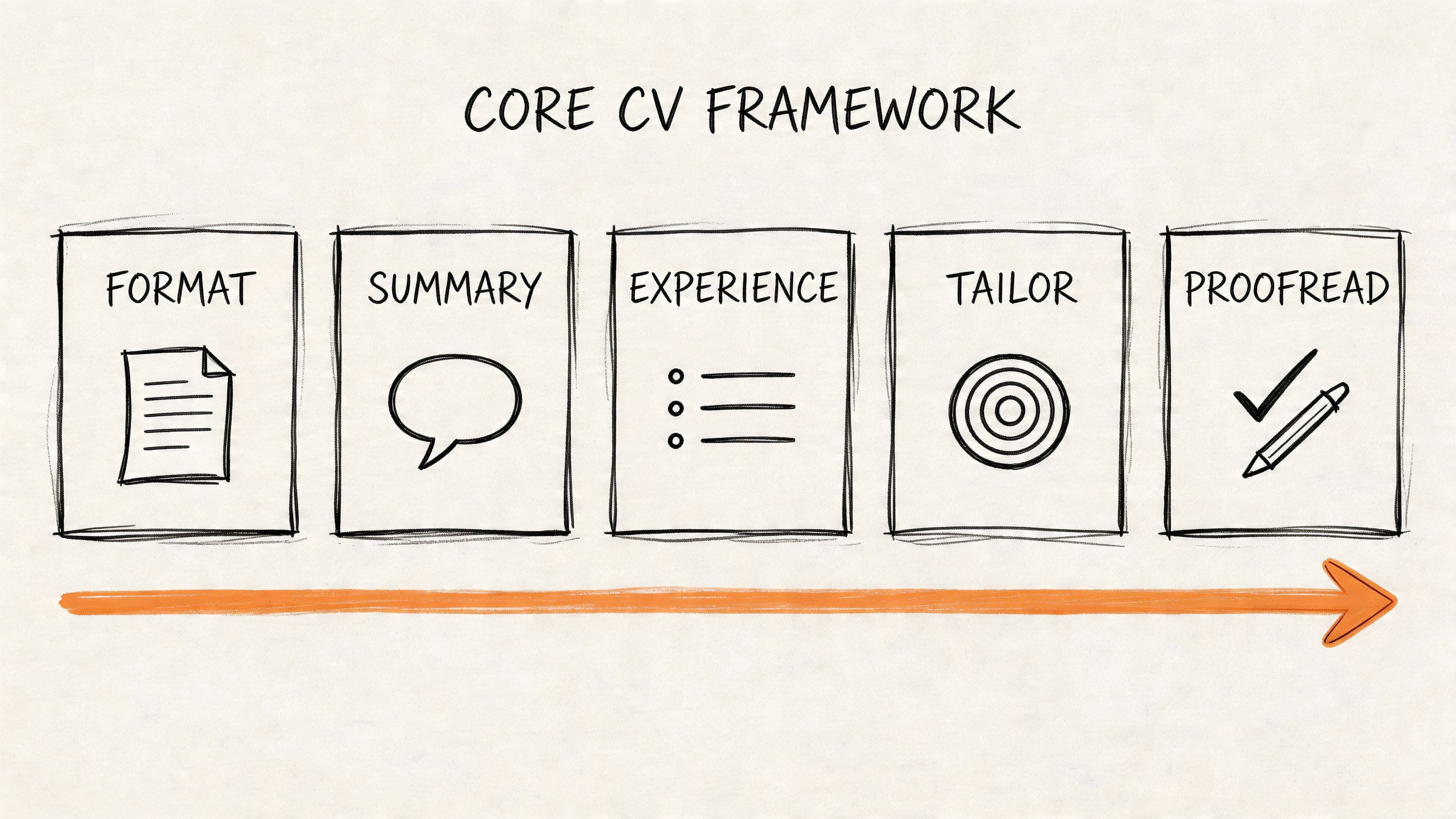
This table outlines the essential steps for creating a job-winning CV. Each stage builds on the last to create a compelling document that proves you are the right candidate.
| Step | Key Objective | Why It Matters |
|---|---|---|
| 1. Choose a Format | Select a clean, reverse-chronological layout. | Ensures readability for both recruiters and Applicant Tracking Systems (ATS). |
| 2. Write a Summary | Craft a concise, 2-3 sentence personal statement. | Hooks the reader and immediately shows your unique value. |
| 3. Detail Experience | List your roles with a focus on quantifiable achievements. | Proves your impact with concrete data, not just a list of responsibilities. |
| 4. Tailor the CV | Customise keywords and content for each specific job. | Increases your match score with ATS and shows the employer you've done your homework. |
| 5. Proofread & Export | Meticulously check for errors and save as a PDF. | Maintains professionalism and ensures your formatting stays intact on any device. |
A modern CV is a marketing document, not an autobiography. Its primary purpose is to secure an interview by showing a direct match between your skills and the employer's needs.
Is your CV actually getting responses?
Your CV might be missing something important
Upload your CV → see its weakest areas → fix them, one by one.
Free. Takes less than 2 minutes.
Step 1: Choose the Right CV Format
Before you write a single word, you must select a structure for your CV. The format is a strategic choice that guides a recruiter's eyes and allows Applicant Tracking Systems (ATS) to parse your career history correctly. Over 90% of recruiters prefer a CV that is simple to scan, so your most important qualifications must be immediately visible.
Why Reverse-Chronological is Best
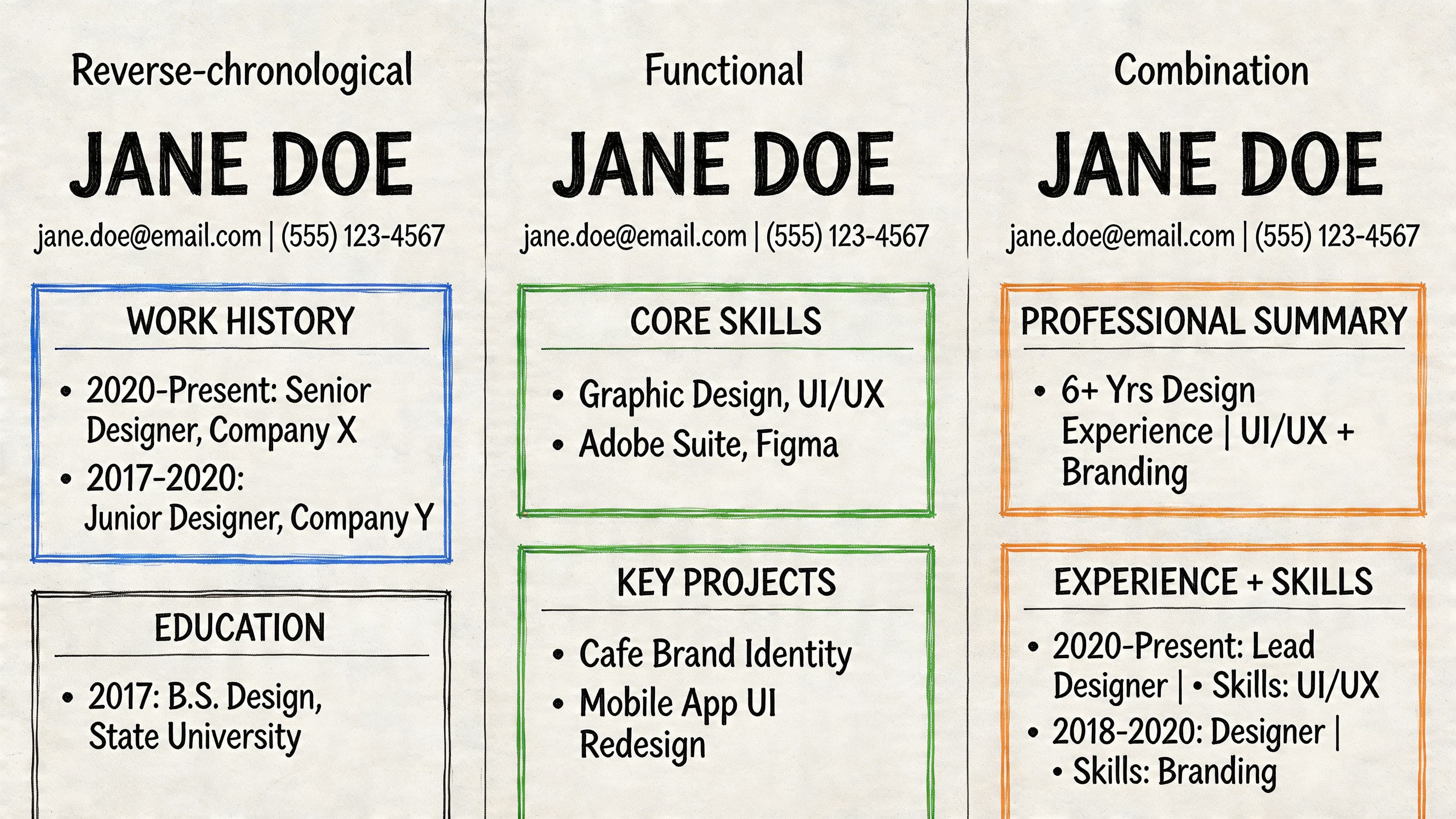
For nearly all job seekers in the UK, the reverse-chronological format is the best choice. It lists your work experience starting with your most recent job and is the standard that recruiters expect.
- Reverse-Chronological: The industry standard. Lists your most recent job first. It's clear, logical, and preferred by both recruiters and ATS software.
- Functional (Skills-Based): Focuses on skills over work history. Recruiters are often suspicious of this format as it can hide employment gaps. Avoid it unless you have a very specific reason, such as a freelance portfolio career.
- Combination (Hybrid): Blends a skills summary with a chronological work history. It can work for career changers but is often more complex than necessary.
Unless you have a compelling reason to do otherwise, use the reverse-chronological format. It is the safest and most effective structure. For a deeper analysis, see our guide on choosing the best resume format.
Step 2: Write Each CV Section
With your format selected, it's time to write the content. Each section must be crafted to prove your value to a potential employer.
Contact Details
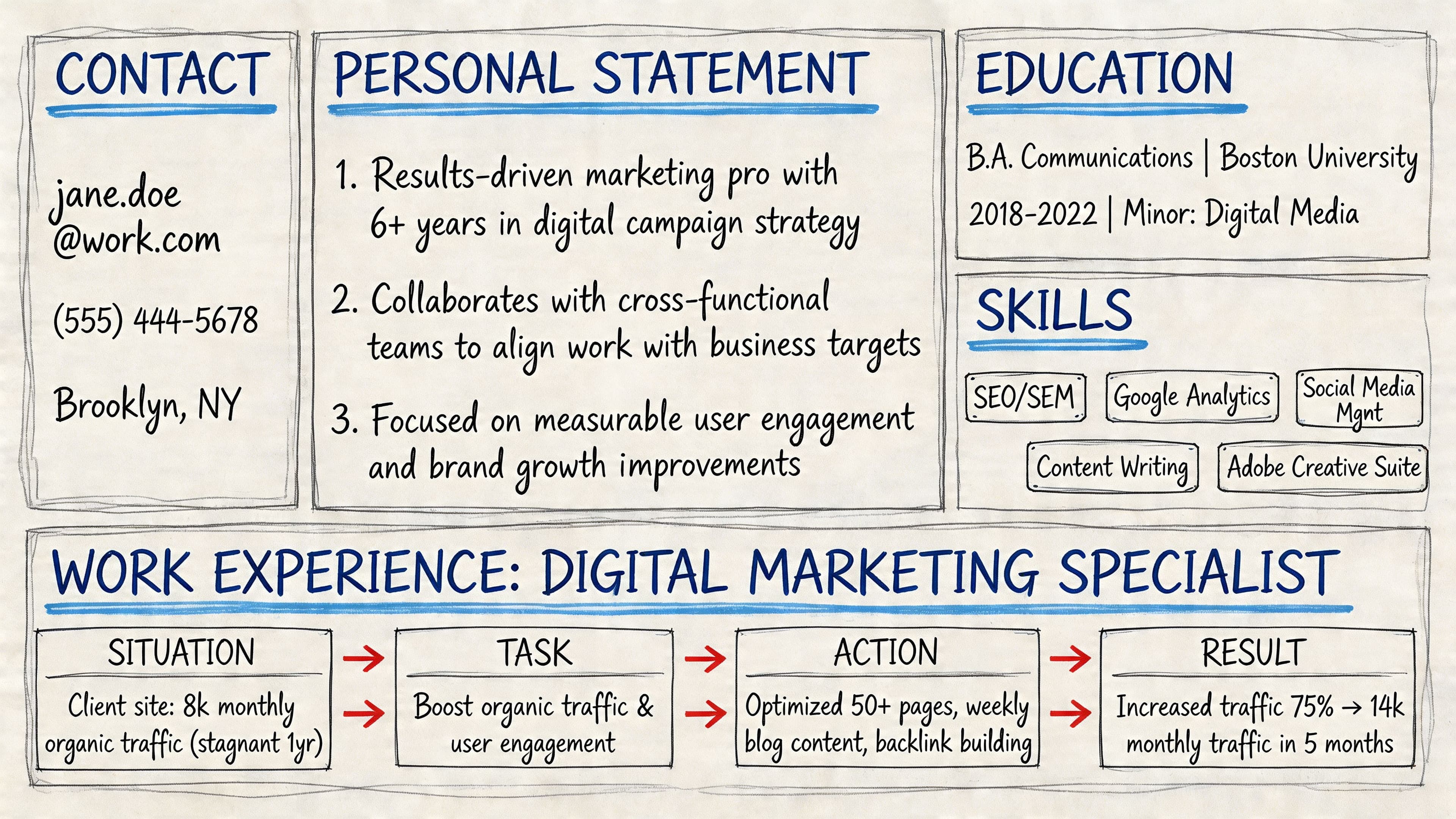
Place your contact information at the very top of your CV.
Must-Haves:
- Full Name: Bold and slightly larger than the rest of the text.
- Phone Number: Your mobile number.
- Email Address: A professional address (e.g.,
firstname.lastname@email.com). - Location: City and county are sufficient (e.g., Manchester, Greater Manchester). Do not include your full street address.
- LinkedIn Profile URL: A custom, up-to-date URL.
In the UK, do not include your date of birth, marital status, or a photograph.
Personal Statement
This is a 2-3 sentence summary at the top of your CV designed to grab the recruiter's attention. It should answer:
- Who are you? (e.g., "A results-driven Digital Marketing Manager...")
- What's your key experience? (e.g., "...with 8 years of expertise in SEO and PPC...")
- What is your career goal? (e.g., "...seeking to drive revenue growth in a senior marketing role.")
Pro Tip: Write this section last. It's easier to summarise your strengths after you've detailed your experience. Learn more in our guide to writing a CV personal statement.
Work Experience
This is the most important section of your CV. For each role, list your title, the company, location, and dates of employment. Under each job, use 3-5 bullet points to highlight your achievements.
Use the STAR method (Situation, Task, Action, Result) to frame your accomplishments:
- Before (Duty): "Managed the company blog and social media accounts."
- After (Achievement): "Grew organic blog traffic by 75% in one year by developing and executing a new SEO-driven content strategy, resulting in a 40% increase in qualified leads."
The 'after' example uses data to prove your impact. For more ideas, see these examples of accomplishments for a resume.
Education and Skills
Your Education section should list your most relevant qualifications first. Include the institution, qualification, and graduation year. You can usually omit GCSEs if you have a higher education degree.
Your Skills section should be a scannable list of your abilities, optimised with keywords from the job description. Organise it with subheadings:
- Technical Skills: e.g., Salesforce, Python, Adobe Creative Suite.
- Soft Skills: e.g., Leadership, Communication, Problem-Solving.
- Languages: Note your fluency level (e.g., Spanish - Fluent).
Step 3: Tailor Your CV with Keywords and Metrics
Sending the same generic CV for every job is a major mistake. Applicant Tracking Systems (ATS) reject up to 75% of CVs before they reach a human. To get past the ATS, you must tailor your CV with keywords from the job description.
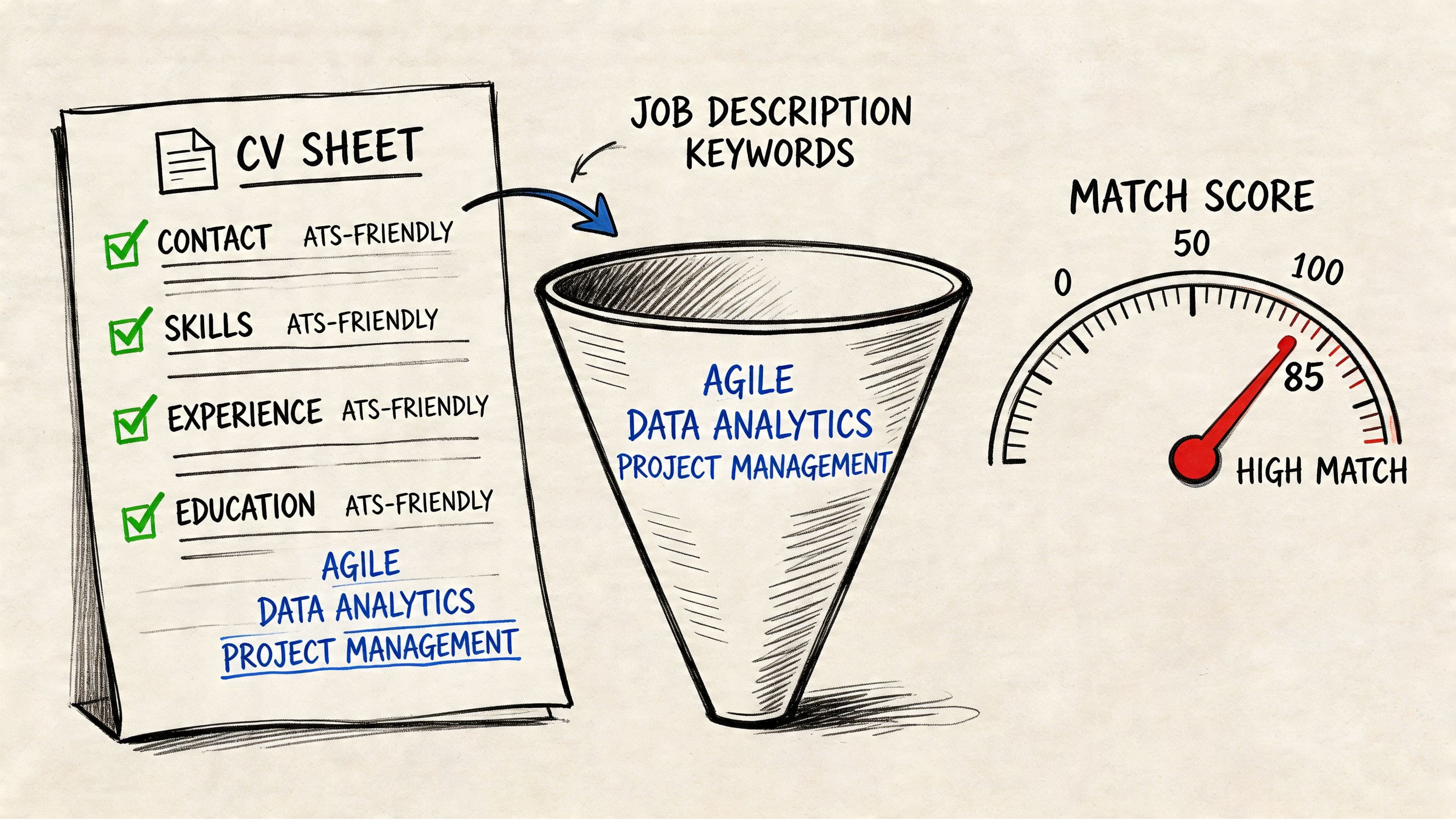
How to Tailor Your CV for a Job
- Analyse the Job Description: Identify essential skills, responsibilities, and qualifications mentioned. These are your target keywords.
- Integrate Keywords: Naturally incorporate these keywords into your personal statement, work experience bullet points, and skills section.
- Quantify Achievements: Use numbers to demonstrate your impact. Instead of "improved efficiency," write "reduced project delivery time by 15%." This transforms vague claims into concrete proof. Learn more about how to use metrics in your CV.
This targeted approach not only beats the ATS but also shows the hiring manager you are a perfect fit for the role. Digging into how recruiters go about building candidate profiles can also give you an edge.
For an automated solution, tools like the CV Anywhere JD Fit Checker can analyse a job description and give you a match score, highlighting which keywords you've missed.
For more tips, read our complete guide on creating an ATS-friendly CV.
Step 4: Common CV Mistakes to Avoid
Even a strong CV can be ruined by simple errors. Avoid these common mistakes to ensure your application looks professional.
- Typos and Grammatical Errors: These are the top reason for rejection. Proofread carefully.
- Generic, Untailored Content: Sending the same CV for every role shows a lack of effort.
- Vague Language: Avoid phrases like "team player" or "results-oriented." Use specific examples and data instead.
- Unprofessional Email Address: An email like
partyboy89@email.comwill get your CV deleted instantly. - Incorrect File Format: Always send your CV as a PDF to preserve formatting. A Word document can appear broken on the recruiter's computer.
Step 5: Proofread and Finalise Your CV
The final step is a thorough review. A single typo can undermine your credibility.
The Final Polish Checklist:
- Read It Backwards: Read your CV from the last word to the first. This trick forces your brain to spot errors it would otherwise gloss over.
- Check for Consistency: Ensure all formatting for dates, titles, and bullet points is consistent throughout the document.
- Verify Contact Details: Double-check your phone number and email address for typos.
- Use a Professional File Name: Name your file
YourName-CV.pdf. Avoid generic names likeCV.pdf. - Get a Second Opinion: Ask a trusted friend or mentor to review it. A fresh pair of eyes will catch mistakes you've missed. For expert guidance, check our guide on conducting a resume review.
Frequently Asked Questions (FAQ)
How long should my CV be?
In the UK, a two-page CV is the standard for professionals with a few years of experience. This provides enough space to detail your achievements without overwhelming the reader. For recent graduates or those with limited experience, a one-page CV is acceptable.
Should I put a photo on my CV?
No. In the UK, the professional standard is to omit a photograph. Including one can introduce unconscious bias and takes up valuable space that could be used to highlight your skills and experience.
What is the difference between a CV and a resume?
The main differences are location and length. 'CV' (Curriculum Vitae) is the term used in the UK and Europe for a detailed, typically two-page document covering your entire career history. A 'resume' is the term used in North America for a brief, one-page summary of your most relevant skills and experience. This guide focuses on creating a UK-style CV.
--- Ready to build a CV that beats the bots and impresses recruiters? The smart builder from CV Anywhere gives you ATS-friendly templates and AI-powered suggestions to create a professional CV in minutes. Start building your new CV for free.