A stronger CV changes outcomes fast. In practice, the biggest gains usually come from making your evidence easier to spot, easier to trust, and easier for software to parse.
If you're asking how can i improve my cv, don't start by changing random lines. Start with a repeatable process. Set a clear structure, write for quick human scanning, prove impact with numbers, check keyword fit against the job description, then tailor from a master version rather than rewriting from scratch each time.
That workflow reflects how hiring works in the UK now. Recruiters scan quickly, ATS tools filter inconsistently, and candidates who treat CV writing as a one-off document usually undersell themselves. Candidates who use a working system tend to produce better applications with less effort over time.
A clean layout still matters because readers process information in sequence. The same principle behind the power of structure in writing applies to CVs. Order affects comprehension. If you want a practical benchmark before you edit, review this guide to a modern CV format that works for recruiters and ATS tools.
The method below combines classic CV fundamentals with newer tools, including JD fit checkers and AI builders, so you can review, refine, and improve each version instead of guessing what to change.
The Foundation: A Professional CV Structure and Format
A better CV starts with structure, not wording. If the layout is messy, your strongest achievements never get a fair read.
Most UK employers still expect a reverse chronological CV because it shows your most recent and relevant work first. That helps a recruiter understand your level quickly, and it helps ATS software parse dates, job titles, employers, and progression without confusion.
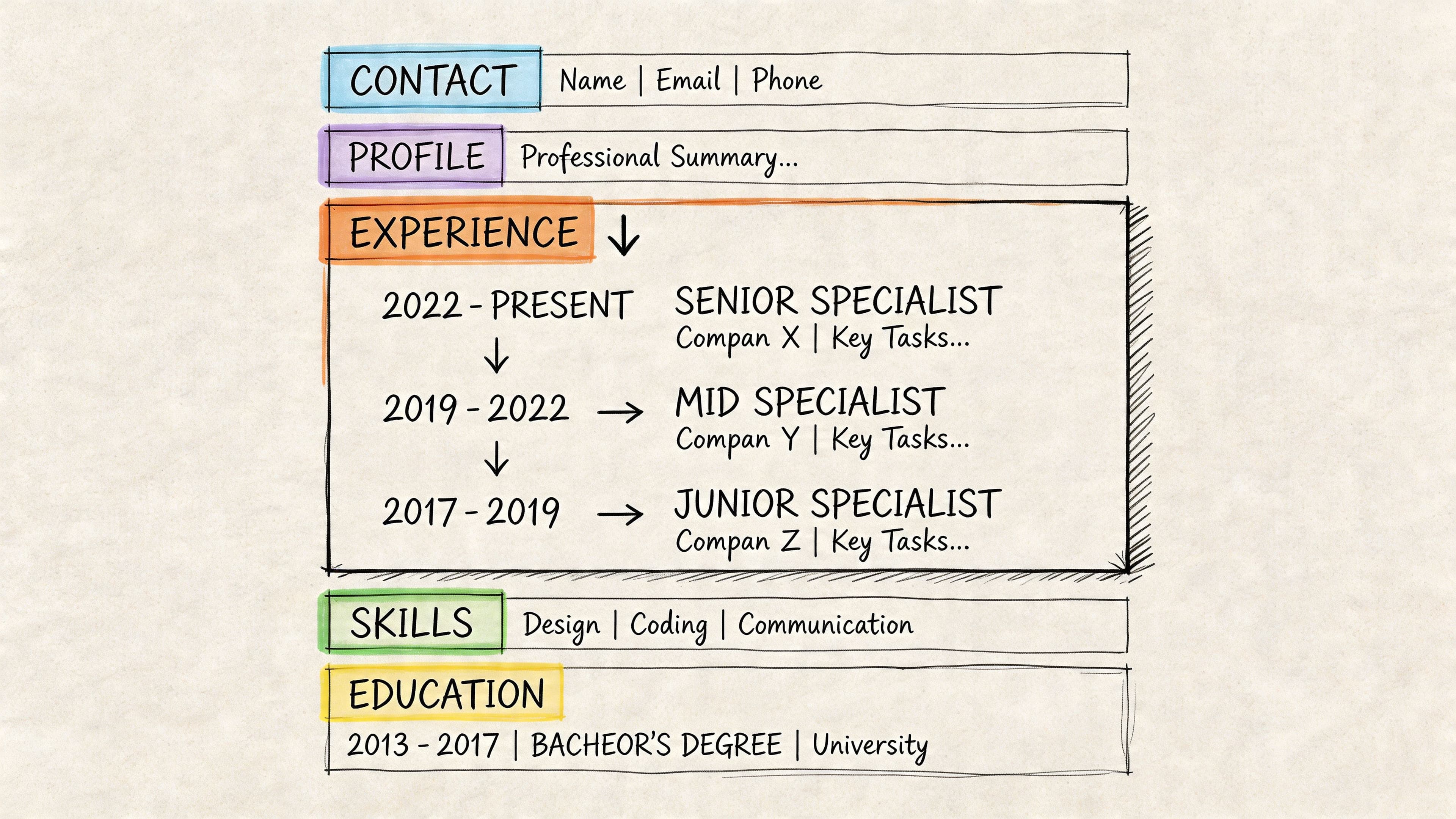
A good CV doesn't need clever design. It needs order. If you want a useful parallel, the power of structure in writing applies here too. Readers process information better when it follows a clear sequence.
Use a clean section order
For most candidates, this order works:
- Name and contact details
- Professional summary
- Key skills
- Work experience
- Education
- Certifications or additional sections if relevant
That's the default because it answers the recruiter's main questions in the right order. Who are you, what do you do, what can you do, where have you done it, and what formal training backs it up?
For UK CVs, your contact header should include:
- Full name as the largest text on the page
- Mobile number you answer
- Professional email address using your name where possible
- Location at city or town level
- LinkedIn profile if it's current and supports your application
Leave out details that don't help.
- Full postal address isn't necessary
- Photo usually isn't needed for a UK CV
- Date of birth, marital status, nationality generally don't add value
- Multiple phone numbers create friction
Practical rule: If a detail doesn't help a recruiter contact you, qualify you, or shortlist you, it probably doesn't belong near the top.
Keep formatting ATS-friendly
Candidates often try to "improve" a CV by making it look more designed. That usually makes it worse. Fancy layouts can create reading problems for screening systems and distract human readers.
Use simple formatting choices:
- One readable font such as Arial, Calibri, or Helvetica
- Consistent bolding for job titles, employers, and headings
- Plenty of white space so each section breathes
- Clear date formatting such as Mar 2022 to Present
- Standard headings like Experience, Education, Skills
Avoid:
- Tables for core content if they interfere with parsing
- Text boxes for important information
- Icons replacing words like phone or email
- Multiple columns unless you know the target system handles them well
- Overdesigned templates with style over readability
A recruiter's eye should land naturally on your most recent role, your strongest results, and the skills that match the job. If they have to hunt, the structure is doing damage.
Name the file properly
This sounds minor, but it isn't. File names matter because recruiters save, forward, and search documents constantly.
Use a naming convention like:
- Firstname-Lastname-CV.pdf
- Firstname-Lastname-JobTitle-CV.pdf
That looks organised and professional. It also reduces the chance of your file getting lost among generic downloads.
PDF is usually the safest format unless the application system asks for something else. It preserves layout and avoids awkward shifts in spacing.
For candidates who want a deeper look at layout decisions, this guide to a modern CV format is a useful companion.
The simplest structural checklist
Before you rewrite a single bullet, check this:
- Can someone understand your career path in under ten seconds
- Are your section headings obvious
- Is your latest experience near the top
- Are dates aligned and consistent
- Does every page look like it belongs to the same document
- Is the top third of page one doing the heavy lifting
If the answer is no to any of those, fix structure first. Strong content on a badly organised CV still underperforms.
Does your CV clearly show results for each role?
Turn a weak CV into a stronger one
Upload your CV → get stronger wording instantly → fix the weakest parts first.
No need to rewrite. Start with your current CV.
Writing Content That Captures Recruiter Attention
Once the format works, the content has to earn attention. Two parts matter more than most candidates realise. Your professional summary and your experience bullets.
If those are weak, the CV reads like a list of responsibilities. If they're sharp, the same background reads like a shortlist candidate.
Write a summary that matches the role
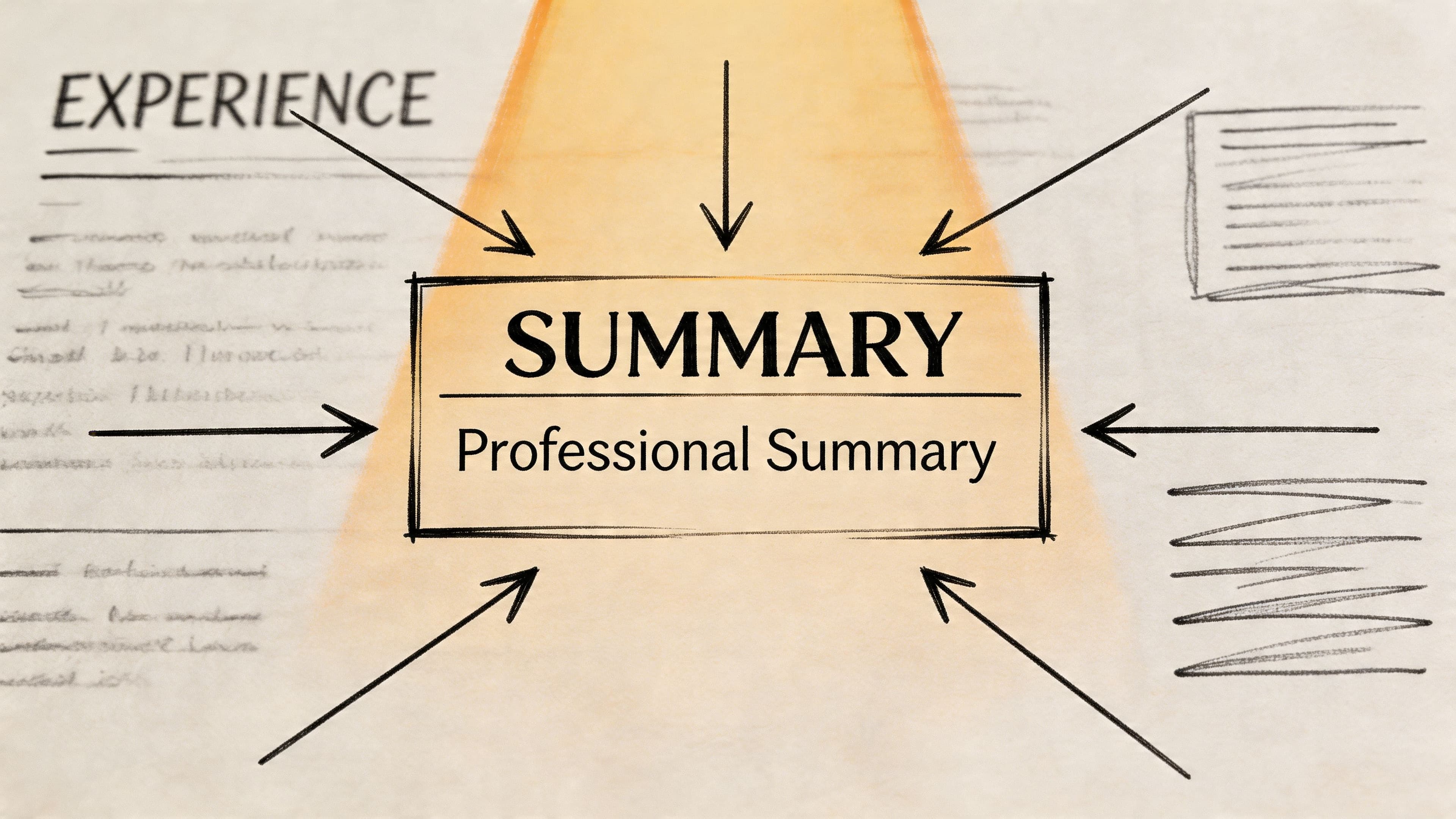
Your summary is not a biography. It's a positioning statement.
A strong summary tells the recruiter what kind of candidate you are, what you're strongest at, and what roles you fit. It should be short, specific, and aligned with the target role.
Weak summary:
Hard-working professional with excellent communication skills looking for a challenging opportunity where I can grow and contribute.
That says almost nothing. It could sit on any CV in any industry.
Stronger summary:
Project coordinator with experience supporting cross-functional delivery, stakeholder communication, and process improvement. Strong background in scheduling, reporting, and keeping deadlines on track in fast-moving teams.
That version gives the recruiter something to work with. It signals function, strengths, and environment.
A summary usually improves when you remove:
- Empty traits like motivated, dynamic, enthusiastic
- First-person statements such as I am or I have
- Career objectives that focus on what you want instead of what you offer
- Generic soft skills lists with no context
If you need help shaping this part, this guide to writing a CV personal statement covers the mechanics well.
Turn duties into achievement bullets
Most weak CVs have one recurring problem. They describe what the job was, not what the candidate changed, improved, delivered, or influenced.
That's where the STAR method works well. According to Resume Assassin's guidance on quantifying your technical resume, using STAR to quantify achievements can increase callback rates by up to 60%, and CVs with 5+ quantified points per page rank in the top 10% of applicant pools. The method is simple: show the Situation, Task, Action, and Result.
You don't need to write all four labels into the bullet. You use them to think clearly.
Before and after examples
Here's what that looks like in practice.
Before
- Responsible for social media accounts
- Helped with customer queries
- Worked on reports for management
After
- Planned and scheduled content across social channels, improving engagement and giving the team a more consistent publishing rhythm
- Resolved customer queries across phone and email, maintaining fast responses in a high-volume support environment
- Produced weekly management reports that clarified performance trends and supported quicker decisions
Those examples are better because they show action and outcome, even without hard numbers.
Where you do have figures, use them.
Before
- Managed staff
- Trained new starters
- Improved reporting process
After
- Managed 15-20 team members
- Trained 50+ employees annually
- Built dashboard reporting that saved 10 hours weekly
The difference is immediate. The second version tells the recruiter scale, scope, and impact.
A recruiter shouldn't have to infer your value. Put it in the bullet.
Use action verbs, not passive phrasing
Good bullets usually start with a strong verb. Weak bullets often start with "responsible for", "involved in", or "helped with".
Use verbs like:
- Led
- Improved
- Reduced
- Delivered
- Implemented
- Coordinated
- Analysed
- Optimised
- Resolved
- Trained
These words create momentum. They also make your role sound active rather than observational.
Keep bullets tight and readable
A good bullet is specific but not bloated. Aim for one or two lines where possible. Front-load the most valuable information.
This is a practical pattern that works well:
- Action + what you did + why it mattered
- Action + scale + result
- Action + tool or method + business outcome
Examples:
- Coordinated diary management and meeting logistics for senior stakeholders, reducing scheduling clashes and keeping projects moving
- Analysed service data and identified recurring issues, helping the team prioritise process fixes
- Supported onboarding for new hires, improving handover consistency across the department
One more point that candidates often miss. Your CV and your online presence should reinforce each other. If your LinkedIn profile is outdated or your public profiles look careless, it creates friction. This piece on the impact of your digital footprint on job opportunities is worth reviewing before you start applying heavily.
The Power of Numbers: How to Quantify Your Impact
Many candidates think they can't use numbers because they weren't in sales or finance. That's rarely true. Most work creates measurable output. You just have to know where to look.
Quantifying achievements on a CV makes your impact easier to trust and easier to compare. Recruiters prioritise evidence over description, and examples such as a 20-30% increase in sales, managing 15-20 team members, or achieving 85% staff retention show clear contribution, as outlined in Recruitment Junky's guidance on quantifiable data to add to a CV.
Where your numbers usually come from
Start by checking the places where evidence already exists:
- Performance reports that show output, deadlines, service levels, or quality
- Dashboards with activity volume, response times, or completion rates
- Team records such as training logs, rotas, client loads, or project counts
- Emails and handovers that mention targets achieved or work delivered
- Calendar history that shows meetings led, stakeholders supported, or recurring responsibilities
Not every bullet needs a percentage. Numbers can show scale, speed, size, frequency, volume, or consistency.
Useful types of metrics include:
- People you managed, trained, supported, or served
- Time saved, reduced, or maintained
- Money generated, protected, or managed
- Volume of cases, reports, calls, tickets, projects, or locations
- Quality shown through satisfaction, retention, or response measures
From vague to valuable quantifying your CV
| Weak Phrase (What to Avoid) | Strong, Quantified Achievement (What to Write) |
|---|---|
| Helped increase sales | Contributed to a 20-30% increase in sales over six months |
| Managed a team | Managed 15-20 team members across daily operations |
| Trained staff | Coached 50+ employees annually during onboarding and development |
| Chaired meetings | Led 12 monthly meetings with 25 delegates |
| Improved retention | Maintained 85% staff retention through consistent team support |
| Worked across locations | Oversaw operations across 10 countries or 50 stores |
| Produced reports | Delivered 200 reports quarterly |
| Answered customer queries | Resolved 95% of queries within 24 hours |
| Did sales outreach | Made 100 sales calls weekly |
| Supported clients | Served 15-20 clients weekly |
That table should also change how you think about your own experience. "I did a lot" isn't persuasive. "I handled this amount, at this pace, with this result" is.
If you don't know the exact figure
Don't invent it. Use a range if you can support it. If you can't support a number at all, make the impact concrete in another way.
Good alternatives include:
- Approximate scale such as 15-20 clients weekly
- Frequency such as weekly, monthly, quarterly
- Scope such as regional, multi-site, cross-functional
- Outcome language such as reduced delays, improved accuracy, efficient reporting
That's still stronger than a flat duty statement.
Better test: If somebody asked, "How much, how often, how many, or how quickly?", could your bullet answer at least one of those questions?
For more examples of strong accomplishment statements, these achievement examples for a CV are useful when you're translating day-to-day work into employer-friendly evidence.
Beating the Bots: Optimising for ATS and Keywords
A strong CV has to pass two readers. The software has to parse it properly, and the recruiter has to believe the match within seconds.
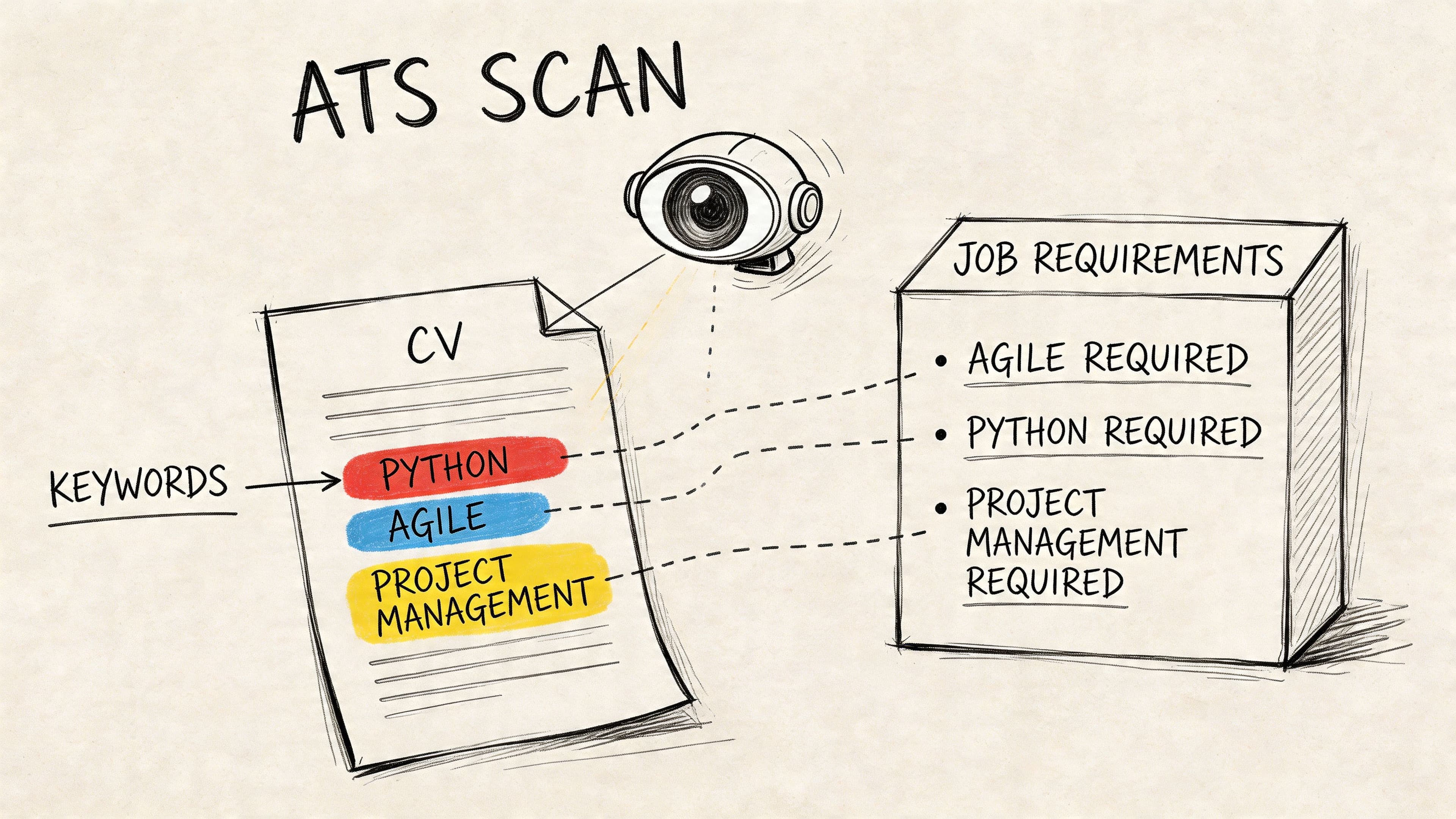
ATS screening is often misunderstood. Good systems do not "think" like a hiring manager, but they do extract job titles, dates, headings, skills, and phrases from the advert. If your CV uses vague wording, messy formatting, or keyword lists with no evidence behind them, you make that job harder than it needs to be.
How ATS actually affects your CV
In practice, ATS performance usually comes down to three checks:
- Clear section headings such as Profile, Experience, Education, and Skills
- Relevant terms from the advert used in the right places
- Supporting context that shows you used those skills on the job
That third point matters. A CV that says "Excel, reporting, stakeholder management, process improvement" may be picked up by a system, but it still reads weakly to a recruiter. A CV that shows where and how you used those terms is much stronger.
If the advert asks for stakeholder management, reporting, Excel, and process improvement, use those exact terms where they are true for your background.
For example:
Weak
- Skills: communication, teamwork, Excel, leadership, stakeholder management, process improvement, analysis, reporting
Stronger
- Produced weekly reporting in Excel for senior stakeholders, improving visibility on delivery risks
- Supported stakeholder management across project milestones and cross-team updates
- Contributed to process improvement work by identifying workflow bottlenecks and fixing handover delays
This is the balance to aim for. Match the employer's language, but keep it attached to real work.
A practical keyword workflow
Use the same process for every application so you are not rewriting blindly.
- Read the job description twice and mark the repeated terms
- Pull out hard skills such as systems, software, methods, or frameworks
- Underline business language such as compliance, scheduling, analysis, procurement, safeguarding, or client-facing work
- Check the person specification for competencies and behaviours
- Add those terms naturally to your profile, core skills, and the most relevant bullets
In the UK, this matters because employers often use formal competency language that candidates do not use about themselves. "Stakeholder engagement" will usually perform better than "liaising with people" if that is what the role asks for. The work may be the same. The wording is not.
Use tools, but use them properly
Modern CV tools can speed this up. JD fit checkers can highlight missing terms. AI builders can suggest phrasing. ATS scanners can flag layout issues or weak keyword coverage.
They are useful for feedback, not for handing over judgment.
I see the same mistake repeatedly. Candidates paste a job description into a tool, accept every suggestion, and end up with a CV full of borrowed language that does not sound like them. That creates a different problem at interview, where they cannot back up what the document claims.
Use tools to spot gaps, then edit with intent. If you want a more detailed breakdown of formatting, parsing, and keyword placement, this guide to optimising your CV for ATS covers the mechanics well.
What to avoid
Poor ATS optimisation is usually easy to spot. It tends to look artificial, repetitive, or both.
Avoid:
- Copying large parts of the job advert into your CV
- Repeating the same keyword across multiple bullets for no reason
- Adding skills you could not defend in an interview
- Using hidden text, white text, tables, or graphics that interfere with parsing
- Forcing terminology that does not fit your actual experience
The rule is simple. Use the employer's wording where it is accurate, and prove it with evidence. That gets better results than keyword stuffing, and it sets up the next step properly, which is adapting your CV with a repeatable workflow instead of starting from scratch each time.
The Master CV: A Repeatable Workflow for Tailoring
If you only change one habit, change this one. Stop sending the same CV to every role.
Customising is usually the highest-impact part of the process because it closes the gap between "generally suitable" and "obviously relevant". According to CV Anywhere's guide on improving your CV, using a master CV and repeatable customisation workflow can boost ATS pass-through rates by up to 75%. Customised CVs with strategic keyword placement and an 80% keyword match to the job description convert 45% better to interviews.
Build one master document first
Your master CV is not the file you send. It's your source document.
It should contain:
- Every role you may draw from
- More bullets than you'd ever use in a single application
- Different versions of achievements for different role types
- All tools, systems, methods, and certifications
- Quantified examples you can reuse and adapt
This solves a common problem. Candidates often tailor by rewriting from scratch, which is slow and inconsistent. A master CV gives you raw material that's already strong.
Tailor in this order
When I review CVs, I usually see candidates editing the wrong parts first. They tinker with wording at the bottom of page two while the top third of page one still doesn't match the vacancy.
A better order is:
Summary
Rewrite this first so the role fit is obvious.Key skills
Reorder skills based on the advert's priorities.Top two recent roles
Adjust bullets to emphasise the most relevant work.Earlier roles
Compress or trim anything less relevant.Final scan against the advert
Check that the employer's priority words appear where they should.
That sequence works because recruiters make fast decisions from the top down.
Identify the top requirements, not every requirement
A job advert can contain a lot of noise. Not everything carries equal weight.
Look for the three or four signals that define the role. For example:
- Operations role might centre on process, reporting, scheduling, and service delivery
- Marketing role might centre on campaigns, content, analytics, and stakeholder management
- Civil service role might centre on behaviours, policy support, communication, and drafting
Once you know the priorities, choose bullets that support them. You're not rewriting history. You're editing for relevance.
Here's the practical trade-off. A broad CV may feel safer because it includes more. In reality, it often feels less convincing because the signal is weak. A targeted CV excludes some decent material so the strongest evidence stands out.
Use tools without outsourcing judgement
AI builders and job description checkers can save time when used properly. They're useful for spotting missing keywords, tightening summary wording, and flagging weak bullets. One option is CV Anywhere, which combines a Smart CV Builder, a JD Fit Checker, and application tracking in one workflow. That's useful if you want to compare your CV against a job description and see what needs strengthening.
Still, tools shouldn't make the decisions for you. Keep your judgement on three points:
- Accuracy. Don't accept inflated wording.
- Relevance. Don't add keywords that don't belong.
- Voice. Don't let the CV start sounding generic.
The strongest CVs feel specific, natural, and clearly aimed at one role.
Final Polish: Proofreading, Design and Tracking
A strong draft can still lose interviews if the final checks are lazy. Small errors signal carelessness, especially when the role needs detail, communication, or professionalism.
Proofread in ways your eyes won't
Spellcheck catches less than people think. It won't reliably catch awkward phrasing, repeated words, missing words, or inconsistent tense.
Use a tighter proofreading routine:
- Read the CV backwards line by line to catch surface errors
- Read it aloud to hear clumsy wording
- Check dates separately so overlaps and gaps are intentional
- Print or preview on another screen because layout issues often hide in your working file
- Ask one other person to review only for clarity and errors, not to rewrite it
If a bullet sounds impressive but confusing, rewrite it. Clarity beats cleverness every time.
Keep design simple at the final stage
This isn't where you add colour blocks or visual flair. It's where you remove distractions.
Final design checks:
- One font family throughout
- Consistent heading sizes
- Aligned bullet indentation
- Equal spacing between roles and sections
- No random bolding
- No widows or awkward line breaks
A polished CV feels controlled. Nothing jumps around the page.
Track versions and outcomes
Candidates who apply seriously should track what they send. Otherwise, you can't tell which version performed better or what to bring to interview.
Track:
- Job title and employer
- Date applied
- Version name of the CV
- Key changes made for that application
- Response status
- Interview notes or follow-up actions
That turns your CV into a system rather than a one-off document. You start spotting patterns. Maybe one summary style performs better. Maybe quantified bullets get more response. Maybe a certain type of role needs stronger skills ordering.
If you want a final pre-submission benchmark, this CV review guide can help you catch issues before you apply.
Frequently Asked Questions About Improving a CV
How long should a UK CV be
Generally, two pages is a sensible target. One page can work for students or early-career candidates. More experienced professionals may need two pages to show enough relevant evidence cleanly.
Should I include a photo on my CV
Usually, no. For most UK roles, a photo doesn't improve your application and can add unnecessary distraction.
What's the fastest way to improve a weak CV
Rewrite your summary, replace duty-led bullets with achievement-led bullets, and tailor the wording to the job advert. Those changes usually have more impact than changing the template.
Can I improve my CV without exact numbers
Yes. Use ranges, frequency, volume, scope, and outcomes if exact figures aren't available. Just don't invent numbers.
Should I write a different CV for every job
You don't need a different document from scratch each time. You do need a customised version for each role. That's why keeping a master CV is so effective.
If you want to improve your CV faster and apply with more consistency, CV Anywhere gives you one place to build, tailor, and track applications. You can create an ATS-friendly CV, compare it against a job description, and keep your application history organised instead of juggling separate files and spreadsheets.